NexGuard Filter for Cambria FTC
Please contact NexGuard regarding license and NexGuard Manager (Server) before proceeding.
License Setup
Place your NexGuard license in the appropriate directory:
- Old Licenses:
C:\Program Files (x86)\Capella\Cambria\cpx64\NexGuard - New Licenses:
C:\Program Files (x86)\Capella\Cambria\cpx64\NexGuardV2
Opening FTC
- Open FTC.
- Import desired source(s) into FTC.
- Sources can be added by clicking ‘Add Sources’ or by using drag and drop.
Adding the NexGuard Filter
- Go to the Encoding tab and click ‘Add’ or double-click to add an encoding preset.
- Adjust encoding settings as needed.
- Go to the Filter tab and add the NexGuard Video Watermarking filter:
- Old Licenses: Select ‘NexGuard Video Watermarking’ filter.
- New Licenses: Select ‘NexGuard Video Watermarking V2’ filter.
- The filter must be added as a Target filter.
Configuring the NexGuard Filter
-
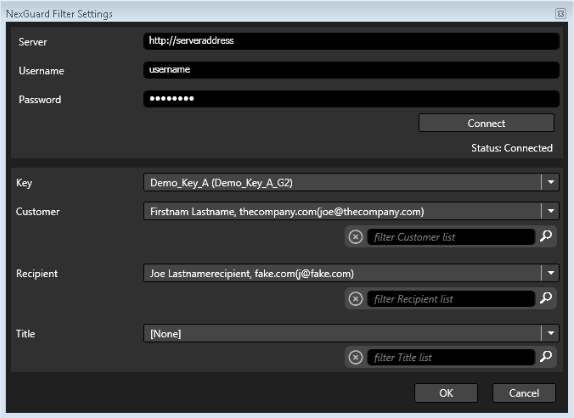
Enter NexGuard Server Manager with Username and Password.
-
Click ‘Connect’ to ensure the connection with the server is successful.
-
Select options for:
-
Key
-
Customer
-
Recipient
-
Title
-
-
Click ‘Ok’ in Filter Settings.
-
The added filter should now appear as:
1:[Target] Video Filter – NexGuard Watermarking -
Click ‘Ok’ in the Preset Editor.
Queueing Jobs
- Under the Encoding tab, select ‘Queue All Jobs’.
- Running jobs can be viewed in:
- Cambria Manager
- NexGuard Manager
- Newly queued jobs will be marked as ‘New’ in NexGuard Manager.
Verifying Watermarking
Watermarking can be verified using NexGuard File QC Reader or a similar tool.
Known Limitations
- Source files must be at least 2 minutes 30 seconds in length.
- Watermarked outputs cannot be watermarked again.
- Concurrent watermarking jobs are limited depending on the license type.
- FTC cannot detect this limitation; users must manage job concurrency.
- NexGuard licenses can only be obtained from NexGuard.
Capella cannot obtain a license on behalf of users. - V1 and V2 licenses are not compatible.
- V2 NexGuard licenses have two types:
- On-Premises
- Cloud
- If you use FTC in a VM or Cloud environment (AWS, etc.), you must obtain a Cloud license from NexGuard.